Emergency contacts right on the booking
How a flying club’s request became emergency contacts in apron:pilot: stored in the profile, at hand right on the booking when it matters.
Many features in apron:pilot started as requests from pilots and administrators. In the series “From the flight line”, I share the request behind a feature and how I built it. First up: emergency contacts.
The request
Martina is the secretary of a flying club in Austria. She wrote to me:
“It would be great if you added a feature for emergency contacts. We collect them on our membership forms, and in an emergency it would help to see them right on the booking.”
The problem behind it
When joining the club, every member names who to notify in an emergency. That information then often sits on paper or in a spreadsheet with the board. If an aircraft is overdue or something happens en route, every minute counts. Nobody should have to search for who to call and at which number.
The booking is the obvious place for it: it already shows who is out with which aircraft.
The solution
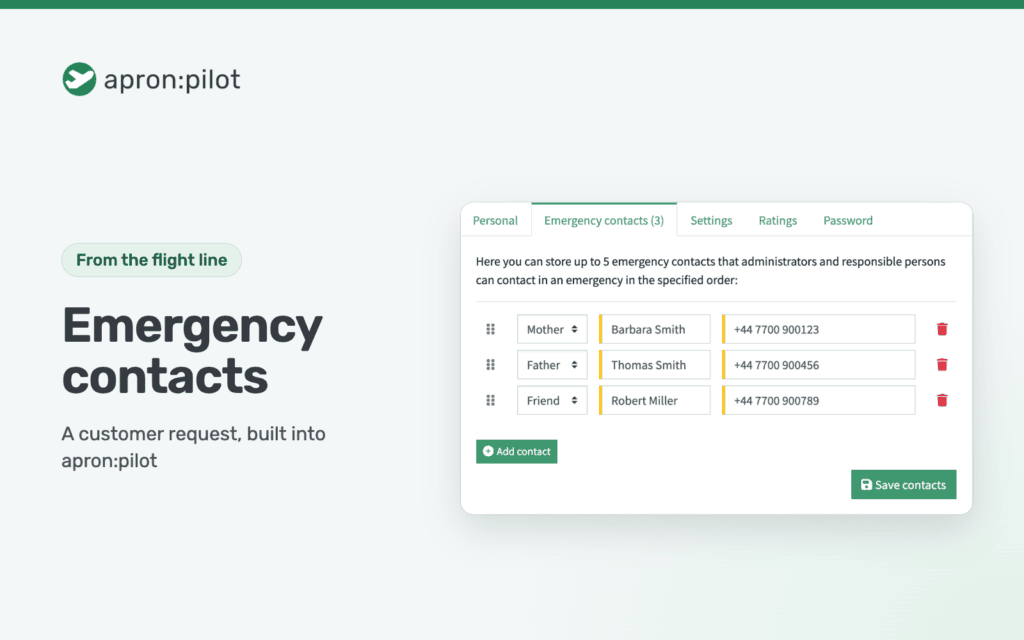
Since version 1.4.0, every pilot stores their own emergency contacts in their profile, under “Emergency contacts”:
- Up to five contacts, each with relationship (such as partner, father or friend), name and contact details like a phone number.
- The pilot sets the order by drag and drop, so you know who to call first.
- Administrators and power users see the contacts in the user details, in exactly that order.
- In the calendar, an icon in the booking details shows that the pilot has stored emergency contacts. One click takes you straight to them.
- Names and contact details are stored encrypted.
Emergency contacts are included in every plan, including Free. In version 1.4.1, I also made the calendar faster when emergency contacts are stored.
My tip: ask your members to add their emergency contacts the first time they log in. That way they are there when you need them, and you can hope you never do.
Got an idea too?
apron:pilot is constantly being developed, and many improvements start with a message like Martina’s. Tell me what you’re missing in your day-to-day operations.
This request came from a real customer. Name and details have been changed to protect their privacy.